Helo AI — Learn More
Your AI-powered assistant, built right into HelloLeads CRM
Helo AI is your AI-powered assistant inside HelloLeads CRM. Simply describe what you need in natural language, and Helo AI can help you find information, update records, manage tasks, generate insights, and navigate the CRM — without having to search through menus.
What You Can Do With Helo AI
Configure your workspace, client segments, and service offerings.
- View your company profile, account type, and subscription status
- View your sales pipeline stages (e.g., Open, Contacted, Won, Lost)
- View or create product/service groups (e.g., Premium Support, Web Design)
- View or create customer categories (e.g., B2B, Enterprise, Retail)
- View or create tags to label prospects (e.g., Hot Lead, Trade Show)
- View, create, or update custom fields (Text, Textarea, Dropdown, Date)
Manage day-to-day lead activities, updates, and follow-ups
- Search, filter, and list leads by name, email, phone, assignment, stage, or priority
- Identify stale or neglected leads with no recent activity
- Get a full 360° view of any lead — comments, activity history, tasks, attachments
- Register a new prospect with contact details, assignee, and stage
- Log call notes, meeting remarks, or updates on a lead
- Edit contact info — name, email, phone, address, company
- Update pipeline stage, groups, tags, or expected deal size
- Schedule follow-ups, assign to a teammate, or mark Do Not Follow Up
- Update birthdays, anniversaries, custom URLs, or LinkedIn profiles
Update large batches of leads at once — Helo AI always confirms with you before executing any bulk change.
- Move multiple leads to a new pipeline stage
- Mass-update priority levels (High, Medium, Low, Not Relevant)
- Batch-assign a customer category
- Overwrite or add product/service associations
- Add or replace tags across multiple leads
- Reassign a group of leads, or mark them Do Not Follow Up
Keep your schedule and reminders organized.
- Fetch outstanding tasks and reminders (by user or lead)
- Create a new task or reminder for yourself or a teammate
- Mark tasks done, adjust due dates, reassign, or add notes
Manage your team and how leads are organized.
- View team members, roles, contact details, and monthly targets
- Add a new team member (Owner, Manager, L1, or L2 role)
- Edit a team member's role, email, phone, or monthly target
- View lead lists (e.g., Website Signups, Facebook Ads campaign)
- Create a new list to organize incoming prospects
- Rename a list or change its owner
Get insights into how your business and team are performing.
- Sales performance — won deals, deal value, leads added, activity counts
- Lead management activity — who added, assigned, or updated the most leads
- Customer communication — outreach across SMS, email, WhatsApp, calls
- Activity metrics — quotes sent, invoices generated, check-ins
Helo AI isn't just for executing tasks — it also answers your "how to" and "where" questions, using the full HelloLeads CRM knowledge base. Instead of searching help articles or asking support, just ask Helo AI directly.
- Search the HelloLeads knowledge base for step-by-step guides and tutorials
- Find in-app pages and get direct navigation links to the exact screen you need
- Send suggestions, bug reports, feature requests, or demo requests to HelloLeads support
Sample Prompts by Role
Focused on day-to-day lead follow-up and closing deals.
- "Show me my follow-ups for today"
- "Create a new lead for John from Acme Corp, phone 98765xxxxx"
- "Add a comment to Alex’s lead — spoke with him, and he wants a demo next week."
- “Move Sarah’s lead to the Negotiation stage.”
- "Show me all my leads tagged 'Hot Lead'"
- "Which of my leads haven't had any activity in the last 2 weeks?"
- “Set a follow-up for Daniel’s lead tomorrow at 11 AM.”
- “Create a task to send the proposal to Emma by Friday.”
- "How do I import leads from an Excel file?"
- "Where do I change my WhatsApp templates?"
Focused on team performance, lead distribution, and pipeline health.
- "Show me all leads assigned to my team that haven't been contacted in 5 days"
- "Move all leads tagged 'Trade Show' to the Contacted stage"
- “Reassign all of Michael’s open leads to Taylor.”
- "How many deals did each team member close this month?"
- "Show me our lead management activity for the last week — who's adding and updating the most leads"
- "Create a new list for the upcoming trade show leads"
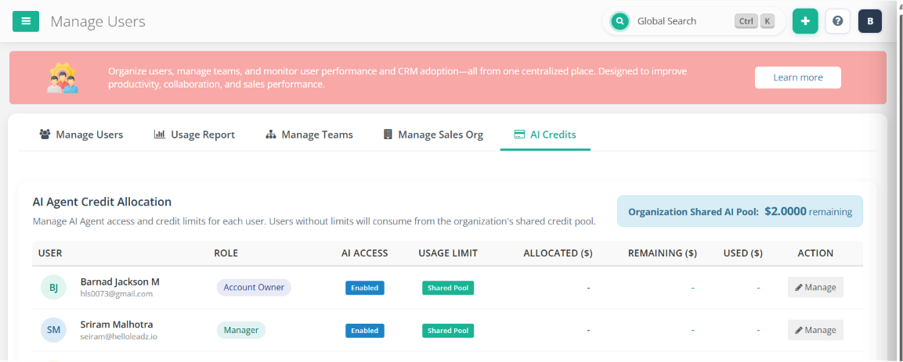
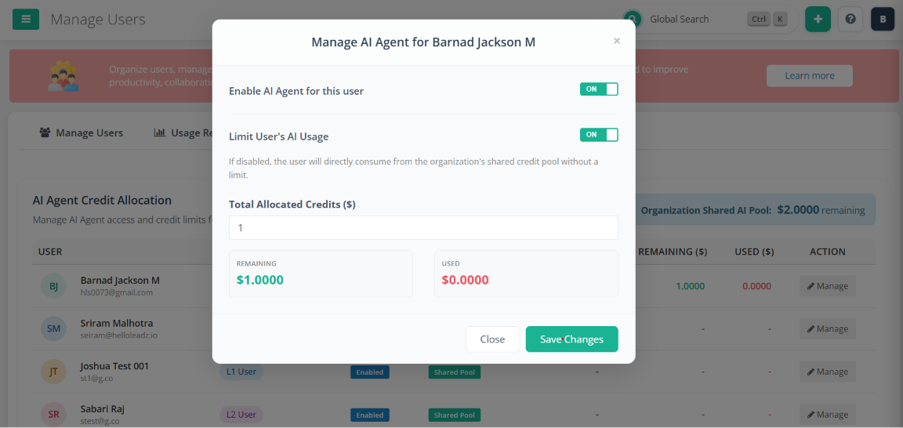
- "Set an AI credit limit of 500 for the new team member"
- "Show me outstanding tasks for the whole team"
- "How do I set up auto-assignment rules for new leads?"
- "Where can I see the leaderboard for my team?"
Focused on business-wide visibility, reporting, and configuration.
- "What's our overall sales performance this quarter — deals won and total value?"
- "Show me our customer communication metrics across SMS, email, WhatsApp, and calls"
- "Add a new manager to the account with a monthly target of USD 50,000"
- "Create a new product group called 'Enterprise Support'"
- "Show me our current subscription and AI credit balance"
- "Which of our customer segments is generating the most deals?"
- "Show me quotes sent and invoices generated across the team this month"
- "Send a feature request to HelloLeads support about custom reporting"
- "How do I integrate HelloLeads with Facebook Lead Ads?"
- "Where do I upgrade my subscription plan?"
Getting Started
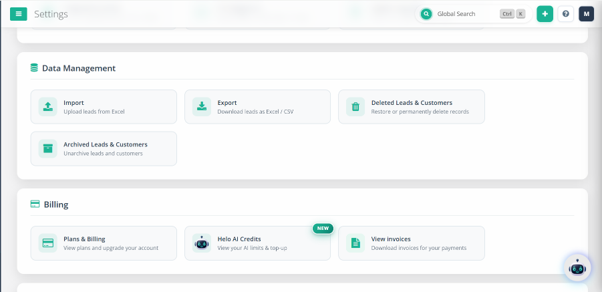
- Make sure you're on a paid plan and have AI credits available (Settings → Helo AI Credits).
- Open the Helo AI chat window inside the HelloLeads web app.
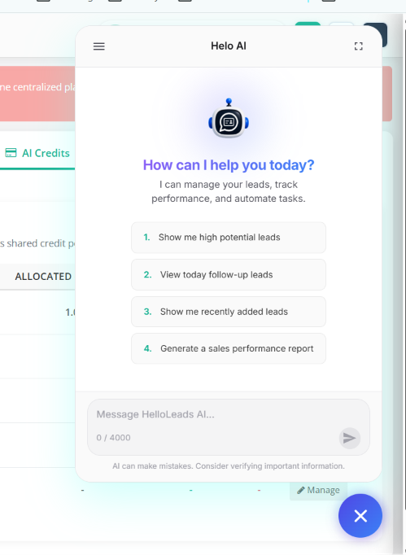
- Type your request in plain language — for example:
- "Show me today's follow-ups"
- "Create a new lead for John from Acme Corp"
- "Move all leads tagged 'Hot Lead' to Contacted"
- "How is my team performing this month?"
Need help? Just ask Helo AI directly, or reach out to HelloLeads support.
Availability & Credits
Helo AI is available on all paid plans.
To use Helo AI, you need to recharge AI credits for your account.
- Purchase additional credits: Settings → Helo AI Credits
- Set a per-user credit rate limit: Settings → Add/Manage Users → AI Credits (control how many credits each team member can use)