Helo AI — Learn More
Your AI-powered assistant, built right into HelloLeads CRM
Helo AI lets you manage your entire CRM — leads, tasks, reports, and more — simply by chatting. No need to click through menus; just tell Helo AI what you need, and it takes care of the rest.
Availability & Credits
Helo AI is available on all paid plans.
To use Helo AI, you need to recharge AI credits for your account.
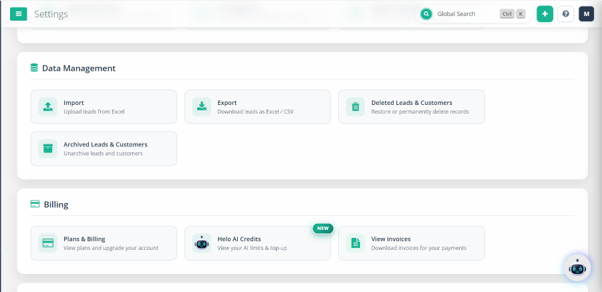
- Purchase additional credits: Settings → Helo AI Credits
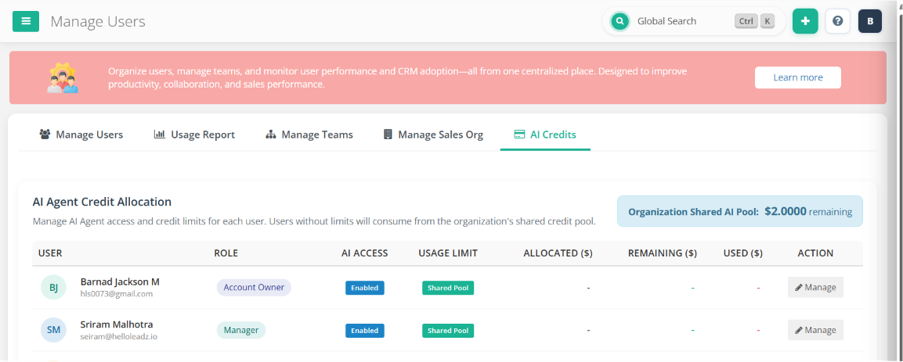
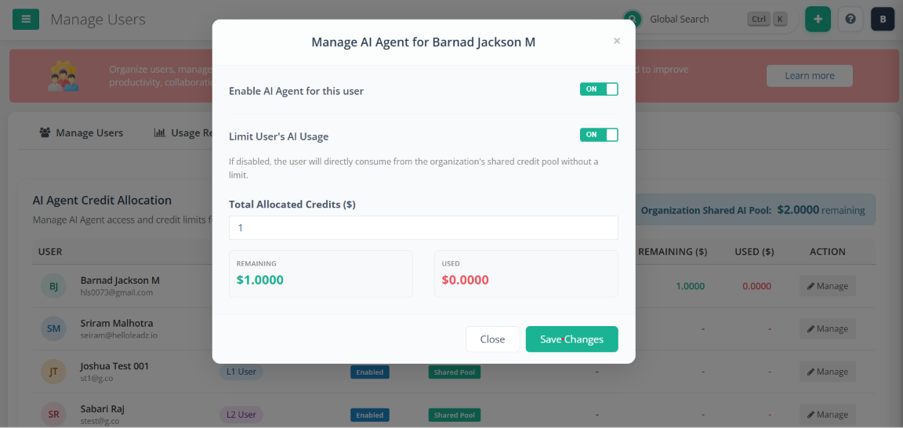
- Set a per-user credit rate limit: Settings → Add/Manage Users → AI Credits (control how many credits each team member can use)
What You Can Do With Helo AI
Configure your workspace, client segments, and service offerings.
- View your company profile, account type, and subscription status
- Fetch your custom sales pipeline stages (e.g., Open, Contacted, Won, Lost)
- View or create product/service groups (e.g., Premium Support, Web Design)
- View or create customer categories (e.g., B2B, Enterprise, Retail)
- View or create tags to label prospects (e.g., Hot Lead, Trade Show)
- View, create, or update custom fields (Text, Textarea, Dropdown, Date)
Handle day-to-day prospect interactions and updates.
- Search, filter, and list leads by name, email, phone, assignment, stage, or priority
- Identify stale or neglected leads with no recent activity
- Get a full 360° view of any lead — comments, activity history, tasks, attachments
- Register a new prospect with contact details, assignee, and stage
- Log call notes, meeting remarks, or updates on a lead
- Edit contact info — name, email, phone, address, company
- Update pipeline stage, groups, tags, or expected deal size
- Schedule follow-ups, assign to a teammate, or mark Do Not Follow Up
- Update birthdays, anniversaries, custom URLs, or LinkedIn profiles
Update large batches of leads at once — Helo AI always confirms with you before executing any bulk change.
- Move multiple leads to a new pipeline stage
- Mass-update priority levels (High, Medium, Low, Not Relevant)
- Batch-assign a customer category
- Overwrite or append product/service associations
- Append or replace tags across multiple leads
- Reassign a group of leads, or mark them Do Not Follow Up
Keep your schedule and reminders organized.
- Fetch outstanding tasks and reminders (by user or lead)
- Create a new task or reminder for yourself or a teammate
- Mark tasks done, adjust due dates, reassign, or add notes
Manage your team and how leads are organized.
- View team members, roles, contact details, and monthly targets
- Add a new colleague (Owner, Manager, L1, or L2 role)
- Edit a team member's role, email, phone, or monthly target
- View lead lists (e.g., Website Signups, Facebook Ads campaign)
- Create a new list to organize incoming prospects
- Rename a list or change its owner
Get insights into how your business and team are performing.
- Sales performance — won deals, deal value, leads added, activity counts
- Lead management activity — who added, assigned, or updated the most leads
- Customer communication — outreach across SMS, email, WhatsApp, calls
- Activity metrics — quotes sent, invoices generated, check-ins
Helo AI isn't just for executing tasks — it also answers your "how to" and "where" questions, using the full HelloLeads CRM knowledge base. Instead of searching help articles or asking support, just ask Helo AI directly.
- Search the HelloLeads knowledge base for step-by-step guides and tutorials
- Find in-app pages and get direct navigation links to the exact screen you need
- Send suggestions, bug reports, feature requests, or demo requests to HelloLeads support
Sample Prompts by Role
Focused on day-to-day lead follow-up and closing deals.
- "Show me my follow-ups for today"
- "Create a new lead for John from Acme Corp, phone 98765xxxxx"
- "Add a comment to Ravi's lead — spoke to him, he wants a demo next week"
- "Move Sathish's lead to Negotiation stage"
- "Show me all my leads tagged 'Hot Lead'"
- "Which of my leads haven't had any activity in the last 2 weeks?"
- "Set a follow-up for Priya's lead tomorrow at 11 AM"
- "Create a task to send the proposal to Vikram by Friday"
- "How do I import leads from an Excel file?"
- "Where do I change my WhatsApp templates?"
Focused on team performance, lead distribution, and pipeline health.
- "Show me all leads assigned to my team that haven't been contacted in 5 days"
- "Move all leads tagged 'Trade Show' to the Contacted stage"
- "Reassign all of Arun's open leads to Kavya"
- "How many deals did each team member close this month?"
- "Show me our lead management activity for the last week — who's adding and updating the most leads"
- "Create a new list for the upcoming trade show leads"
- "Set an AI credit limit of 500 for the new team member"
- "Show me outstanding tasks for the whole team"
- "How do I set up auto-assignment rules for new leads?"
- "Where can I see the leaderboard for my team?"
Focused on business-wide visibility, reporting, and configuration.
- "What's our overall sales performance this quarter — deals won and total value?"
- "Show me our customer communication metrics across SMS, email, WhatsApp, and calls"
- "Add a new manager to the account with a monthly target of ₹5,00,000"
- "Create a new product group called 'Enterprise Support'"
- "Show me our current subscription and AI credit balance"
- "Which of our customer segments is generating the most deals?"
- "Show me quotes sent and invoices generated across the team this month"
- "Send a feature request to HelloLeads support about custom reporting"
- "How do I integrate HelloLeads with Facebook Lead Ads?"
- "Where do I upgrade my subscription plan?"
Getting Started
- Make sure you're on a paid plan and have AI credits available (Settings → Helo AI Credits).
- Open the Helo AI chat window inside the HelloLeads web app.
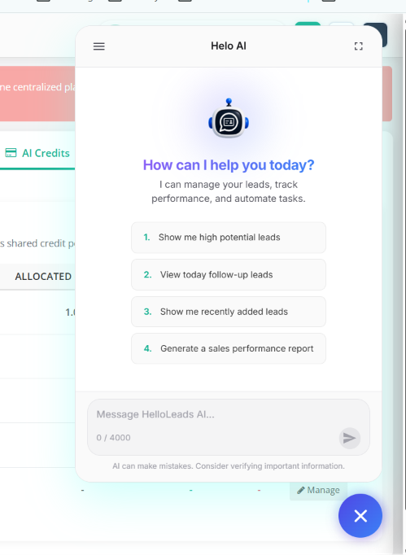
- Type your request in plain language — for example:
- "Show me today's follow-ups"
- "Create a new lead for John from Acme Corp"
- "Move all leads tagged 'Hot Lead' to Contacted"
- "How is my team performing this month?"
Need help? Just ask Helo AI directly, or reach out to HelloLeads support.